How to's
| Site: | East Midlands PCC & SiC Network |
| Course: | East Midlands PCC & SiC Network |
| Book: | How to's |
| Printed by: | |
| Date: | Saturday, 17 January 2026, 1:52 PM |
Description
This book shows how to:
- Navigate the site
- Create an account
- Self-enroll onto a course
Site Navigation
Here is a Quick access guide to help navigate the main areas of moodle.
Also see this video on how to navigate the course page. Please note this video shows my view and you will not be able to see everything until it opens up- do not panic it will show eventually.
If you are still struggling after viewing both of the above resource, please get in touch, the network team can help navigate the site.
Video transcript
Hi welcome to this Moodle tutorial. I'm going to show you how to navigate the East Midlands network Moodle site.
So when you log in, you will enter this home page and what you'll see is a welcome sign to the Moodle site and below we'll have your available courses. This may look slightly different due to what courses you are enrolled on.
Below this you'll see any site announcements and you'll be able to subscribe to the forum if you wish.
Here it says my courses of which you can enrol in.
On the right hand side you've got calendar which will show you any important dates that are coming up. You can obviously click this to full view, but this is in the right hand side bar. Below that it shows that you are logged in user and below it will show you through any other online users.
In the top right hand corner, you've got your profile and if you click here you can see the drop down for profile grades, calendar files and you can also look at your own preferences.
Next to that, there was a message button and here it will show you messages for yourself. Once you've sent to other people and if there are any group messages.
To the left of that is the notification bar. So any important notifications will come in here and you can Click to view. And there's also settings button here for preferences. Let's go back to the homepage.
So in the top left corner, you've got home dashboard, my courses.
If we were to click on dashboard this will take you to an activity overview overview. So here it will show you a timeline of what is due, what's overdue, what's due in the next 30 days, three months and so on and so forth.
You can toggle this to different causes if you're enrolling more than one, you can select the relevant course.
Any announcements will come up here on the right hand side, and if you've started a start a course, it will come up here. If you've started a course and you've recently accessed something, it will show that on the right hand side.
To enter a course. You can either go from the home page and select the course that you were enrolled in, or you can select the my courses tab, which will then open the courses that are available to you.
Please note my view might look slightly different as an administrator I have the ability to manage and create additional courses.
So say we want to enter the paediatric tracheostomy confidence course. We can click on the course and we will open the course page.
Note how the top bar remains the same and note that edit mode will not be available on yours. It's purely for mine from an administration perspective.
On the right hand side is a bar and a block draw which will show things like your welcome message, your course completion status. You can close that and hide it, and if you want to reopen it you just open block tool with a grey tab equally on the left hand side there is a course index which you can open and close as you wish. With this you can also press the three little dots to expand or collapse the entire look.
So you can then open at your leisure. Or you can open all of it, and see what's available to you.
Now the way the courses are designed is that they open up in chronological order. So what you see and when you enter the course. Is all the content here on my page, but that's because I'm an administrator.
If you were to enter the course, you can see these little locks on here. These will show that they're not available until you've done a certain task, OK.
Tasks are in pink. For things that need to be uploaded, other tasks may be a blue book, which means it's something that you need to read. Now you can see here mine says done. That's because I've viewed it.
If it says to do, it will tell you here what you must do. So this says you must receive a grade. So to do that you would click on the link. Any hyperlink means you can click it and then you would click add a submission.
It then tells you here in this box what you must do, and then this says complete the pre-order survey via the below link. So you click the link it will take you to the page complete the survey and then you can confirm by typing in the box that you've done it and press save. I'm going to press cancel just for the purpose of this. I've I have not done so let's go back to the course page.
Here you can see that there's a navigate the Moodle site if you forget you can come back here. There's a Quick guide and there's also this video on there for you.
There are lots of different resources within the different courses and they are resembled by links with Blue link. PDF will be the PDF signed and if there's a page it will be there for you.
So as the course opens up and you work your way through, you will find things like pages, books. You will find quizzes and these are resembled by pink boxes.
You may find things like forums, so here is a forum for you to type in and if you have questions you can add them to those. So let's have a look at the forum so we can hear to start today discussion topic and you can add a post. You can add a discussion topic and that will add to the forum.
Let's go back into the course.
As you complete the course, it will say in progress here and it will also tell you what you need to do. You can add some more details and you can look at a little report as well.
Work your way through the course. Take your time, and if you have any questions, you can contact me here.
Create an account
How to create an account on this moodle site.
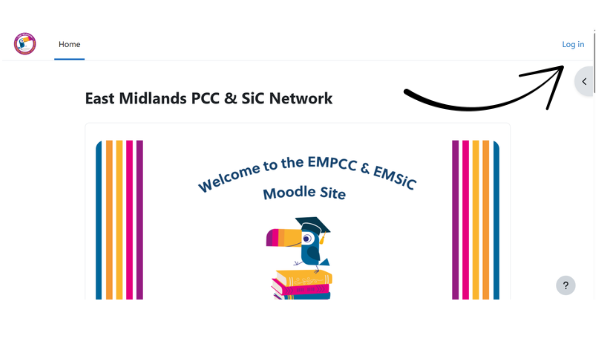
- Click 'Log in' in the top right hand corner of the home page.
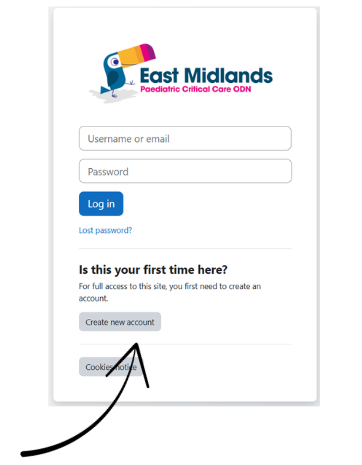
- Select 'Create new account'
- Complete the form fields using your details. Note you must use an nhs.net email address to register
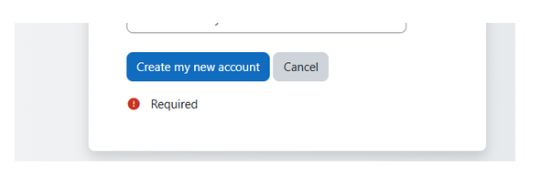
- Ensure you have filled all the required fields then click 'Create my new account'
- Confirm your account via the email sent by moodle
- Log in to your account
Self enroll on a course
- Once you have logged in, click on the course you wish to enrol onto.
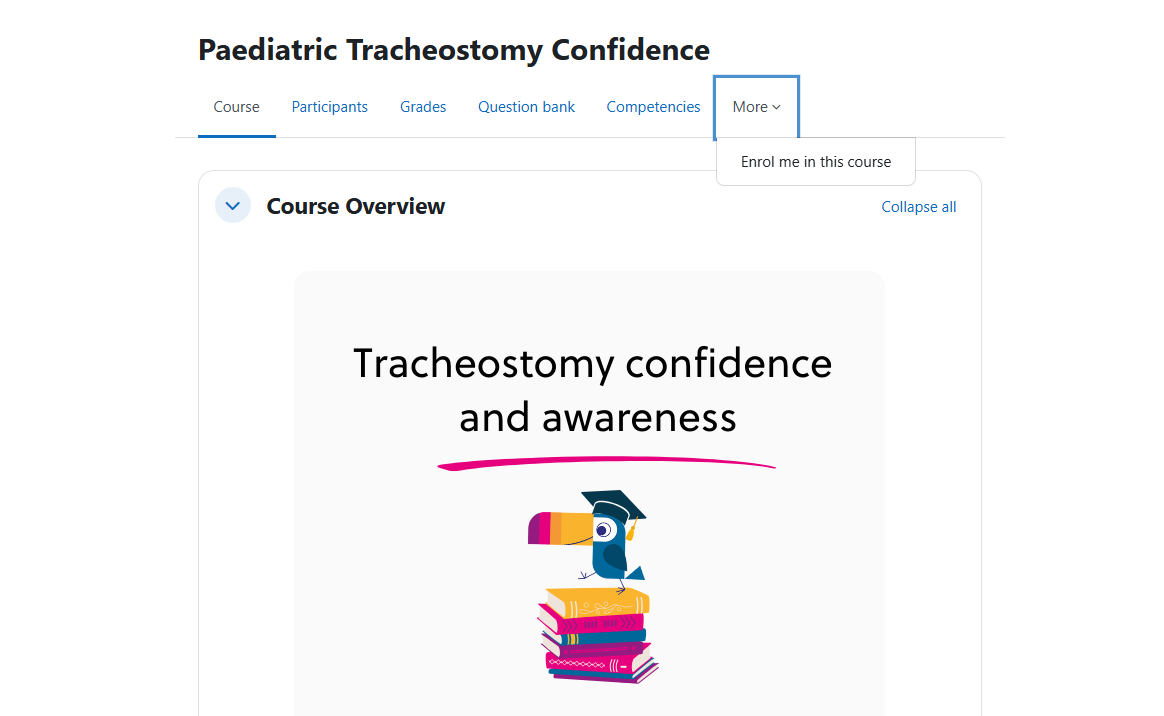
- Select more, 'enrol me in this course'.
- You will be asked to enter a password for the course. This is to prevent spam access to the site.
- Enter the password sent to you via email after completing the booking form.
Please note Level 1 Paediatric Critical Care Courses do not have self-enrollment functions.
You should then have access to the course content to complete the module.